
LABEL EVERY GRAFT
Create a consistent set of cultivar and rootstock labels before you start a grafting batch. Click the sample sheet to edit its text, or expand Fields to work through the details. The same batch information repeats on every label; tree numbers advance automatically.
Click-to-edit template · 3 layouts · No sign-up · Private, local editing
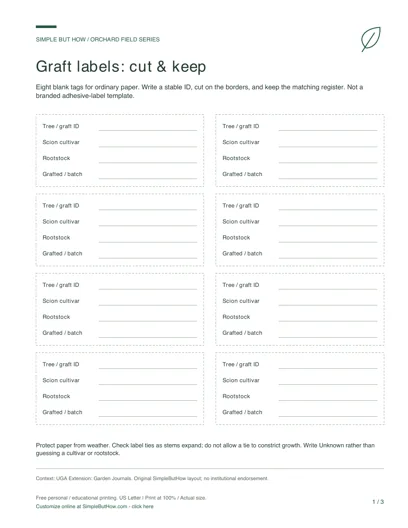
READY TO PRINT · NO FORM TO FILL
Free Graft Labels & Identity Record PDF
Download this original three-page set now, or use the editor below to make a personalized sheet.
- 8 cut-apart graft labels
- Label identity register
- Multi-graft branch map
This download: 8.5 × 11 inches · Low-ink design · 0.75-inch left binding margin. Print at 100% / Actual size. Blank print-and-write pages, not fillable PDF forms. Choose an interactive PDF or A4 edition below. Free personal and educational use; no email or account required.
More PDF formats: fillable & A4
Download first, open in a PDF reader, type into the fields and save a copy. Check the saved file before printing. Sketch areas stay blank for drawing; costs do not calculate automatically.
See how a completed sheet can look: clearly marked examples, not actual field records.
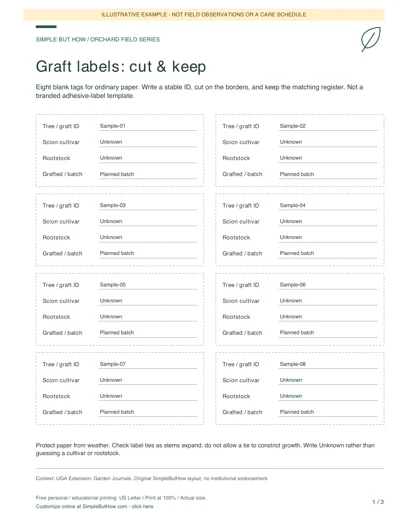
Build your own orchard field sheets
Choose a worksheet, enter your details and preview the result. Each tool has its own downloads; you do not have to print the whole page.
Private by design: no account or email gate. Device-draft saving is optional and off by default in the template editor. Download a JSON data file before leaving, and load it here later to continue. Saved files contain your entries: keep them private.
Blank PDF (3 pages, US Letter) · Filled sheets: HTML download or Print / Save PDF · Spreadsheet data: CSV · Editable backup: JSON
1Graft label generator
Make numbered labels for a grafting batch. Choose 1-40 labels, then print or download your filled sheet.
Ordinary paper layout, not an adhesive-label template. Protect paper from weather and avoid constricting a growing stem with its label tie.
HTML opens offline in a browser; print it or save it as PDF. CSV is a spreadsheet export, not the editable backup. Load the JSON file above to edit later. Print opens your browser dialog; it does not automatically download a PDF.
Enable JavaScript to generate a filled preview, or use the blank PDF pack.
How to use this label generator
- Enter a cultivar and documented rootstock clone. Use Unknown when the source is not recorded; the generator cannot identify plant material.
- Set the batch ID, collection or grafting date, label count and first tree number. Choose a template and check the on-screen sheet.
- Download HTML or open Print / Save PDF. Print one ordinary-paper test sheet at your chosen paper size before making a full batch. Save JSON if you want to change the labels later.
A useful record, not invented evidence
Illustrative batch: Gala on G.41, batch A, eight labels starting at tree 101. The sheet numbers them 101–108. This is a formatting example, not a claim that any material was tested or grafted.
Questions about this generator
Can every label have a different cultivar?
This generator repeats one batch’s cultivar and rootstock with sequential tree numbers. Export a separate batch for each pairing, or use the orchard inventory generator for mixed trees.
Will it fit Avery or another adhesive label stock?
No fixed commercial label dimensions are claimed. These are ordinary-paper layouts. Check your printer settings and protect labels from weather; do not tighten a tie around a growing stem.
Can I change a saved label sheet?
Load its JSON file to recover the editable fields and design. HTML and PDF are presentation copies, not editable project backups.
Keep your editable copy
Save project (JSON) retains your fields and design choices. Optional device drafts are off by default: if enabled, valid edits are saved only in this browser, with explicit Restore and Delete controls. There is no server-side account or cross-device sync. Browser data can be cleared, so keep a downloaded JSON backup and avoid device drafts on shared computers. Leave warnings depend on browser support and are not a backup.
An HTML or PDF download is a presentation copy. When you load a file, it is read in your browser, not uploaded. Layouts adjust to your content. Long entries may use more than one printed page; check the browser print preview and choose the matching A4 or Letter paper size. Template changes preserve your entries.
Explore all six field-template generators