
OBSERVE YOUR OWN FLOWERING SEASON
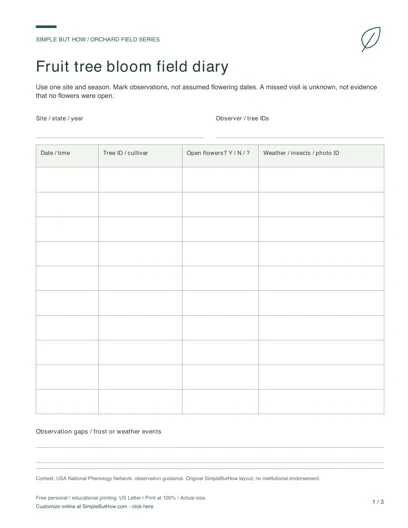
Keep first and last observed open-flower dates for trees at one site in one season. The template draws a timeline when at least two entries have complete date ranges. It makes your observations easier to compare without turning them into a compatibility score or forecast.
Click-to-edit template · 3 layouts · No sign-up · Private, local editing
READY TO PRINT · NO FORM TO FILL
Free Fruit Tree Bloom Diary PDF
Download this original three-page set now, or use the editor below to make a personalized sheet.
- Open-flower observation diary
- 14-day bloom timeline
- Season comparison sheet
This download: 8.5 × 11 inches · Low-ink design · 0.75-inch left binding margin. Print at 100% / Actual size. Blank print-and-write pages, not fillable PDF forms. Choose an interactive PDF or A4 edition below. Free personal and educational use; no email or account required.
More PDF formats: fillable & A4
Download first, open in a PDF reader, type into the fields and save a copy. Check the saved file before printing. Sketch areas stay blank for drawing; costs do not calculate automatically.
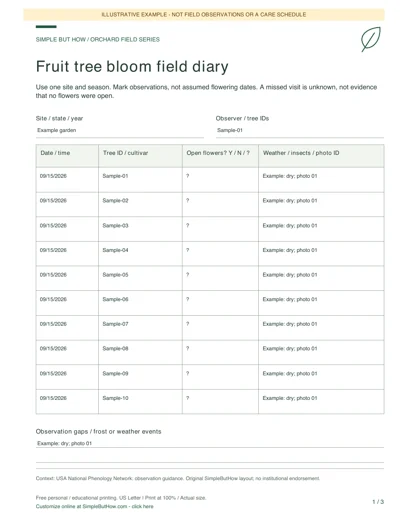
See how a completed sheet can look: clearly marked examples, not actual field records.
Build your own orchard field sheets
Choose a worksheet, enter your details and preview the result. Each tool has its own downloads; you do not have to print the whole page.
Private by design: no account or email gate. Device-draft saving is optional and off by default in the template editor. Download a JSON data file before leaving, and load it here later to continue. Saved files contain your entries: keep them private.
Blank PDF (3 pages, US Letter) · Filled sheets: HTML download or Print / Save PDF · Spreadsheet data: CSV · Editable backup: JSON
1Fruit tree bloom diary generator
Record first and last observed open flowers for each tree in one season. Two or more complete entries generate a timeline of your entered flowering windows.
The timeline shows your entered dates, not a bloom forecast or a test of genetic compatibility. Date overlap does not prove effective pollination or fruit set. Do not combine observations from different sites or seasons.
HTML opens offline in a browser; print it or save it as PDF. CSV is a spreadsheet export, not the editable backup. Load the JSON file above to edit later. Print opens your browser dialog; it does not automatically download a PDF.
Enable JavaScript to generate a filled preview, or use the blank PDF pack.
How to use this template
- Name the site and season. Give each tree a stable identifier and cultivar name if documented.
- Enter first and last observed open-flower dates. Add weather, bee activity or gaps in your observation schedule so another reader understands the record’s limits.
- Compare the generated windows, then save the diary. Start a separate project for another site or year; do not combine seasons into one timeline.
A useful record, not invented evidence
The example windows April 1–5 and April 4–8 overlap on April 4 and 5. Endpoints are included. That overlap describes entered dates only; it does not establish genetic compatibility, pollen transfer or successful fruit set.
Questions about this generator
Does overlapping bloom mean two trees can pollinate each other?
No. Date overlap alone does not answer genetic compatibility, pollen fertility or pollinator questions. Use the related pollination checker for its stated scope and keep local observations separate.
Why is my timeline missing?
At least two entries need both a first and last flowering date. Incomplete entries stay in the record. Correct reversed or invalid dates before exporting.
Can I combine several years?
Use one project per site and season. The generator limits complete date ranges to a 366-day span; this is a validation limit, not a definition of the flowering season.
Keep your editable copy
Save project (JSON) retains your fields and design choices. Optional device drafts are off by default: if enabled, valid edits are saved only in this browser, with explicit Restore and Delete controls. There is no server-side account or cross-device sync. Browser data can be cleared, so keep a downloaded JSON backup and avoid device drafts on shared computers. Leave warnings depend on browser support and are not a backup.
An HTML or PDF download is a presentation copy. When you load a file, it is read in your browser, not uploaded. Layouts adjust to your content. Long entries may use more than one printed page; check the browser print preview and choose the matching A4 or Letter paper size. Template changes preserve your entries.
Explore all six field-template generators