
KEEP THE SOURCE WITH THE SCION
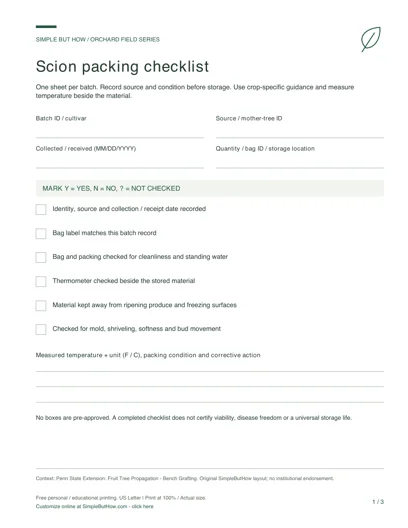
Make a packing and inspection record for dormant scionwood. The checklist starts at Not checked so an empty form never appears to certify safe storage. Keep a separate file for each identifiable batch and record measured conditions, not just the refrigerator’s dial setting.
Click-to-edit template · 3 layouts · No sign-up · Private, local editing
READY TO PRINT · NO FORM TO FILL
Free Scion Storage Checklist PDF
Download this original three-page set now, or use the editor below to make a personalized sheet.
- Packing and identity checklist
- Temperature inspection log
- Batch movement record
This download: 8.5 × 11 inches · Low-ink design · 0.75-inch left binding margin. Print at 100% / Actual size. Blank print-and-write pages, not fillable PDF forms. Choose an interactive PDF or A4 edition below. Free personal and educational use; no email or account required.
More PDF formats: fillable & A4
Download first, open in a PDF reader, type into the fields and save a copy. Check the saved file before printing. Sketch areas stay blank for drawing; costs do not calculate automatically.
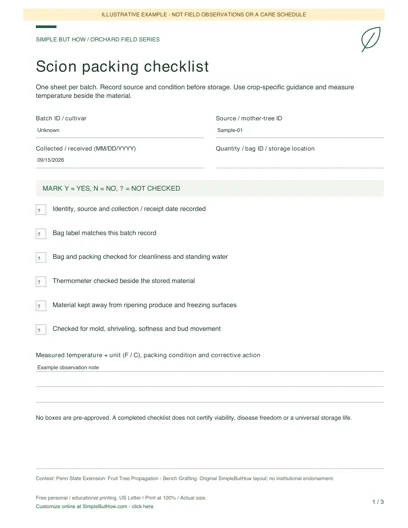
See how a completed sheet can look: clearly marked examples, not actual field records.
Build your own orchard field sheets
Choose a worksheet, enter your details and preview the result. Each tool has its own downloads; you do not have to print the whole page.
Private by design: no account or email gate. Device-draft saving is optional and off by default in the template editor. Download a JSON data file before leaving, and load it here later to continue. Saved files contain your entries: keep them private.
Blank PDF (3 pages, US Letter) · Filled sheets: HTML download or Print / Save PDF · Spreadsheet data: CSV · Editable backup: JSON
1Scion storage checklist and log
Record the identity, storage location and condition of a scion batch. The packing checklist uses Yes / No / Not checked rather than assuming a check was passed.
Use crop-specific guidance and an independent thermometer. These observations do not establish a universal safe temperature, storage life or material viability.
HTML opens offline in a browser; print it or save it as PDF. CSV is a spreadsheet export, not the editable backup. Load the JSON file above to edit later. Print opens your browser dialog; it does not automatically download a PDF.
Enable JavaScript to generate a filled preview, or use the blank PDF pack.
How to use this template
- Record the batch or cultivar, source, collection date and storage position. Match the batch ID to the label on the bag.
- Work through each packing check and select Yes, No or Not checked. A No is a prompt to investigate with the linked guidance, not an automatic diagnosis.
- Add actual temperature readings with their units, material observations and actions. Export a clean sheet for your records and save JSON before leaving the page.
A useful record, not invented evidence
“Measured at the bag: [value] °C” and a dated description of the packing are useful records. A blank value or an unchecked box is not evidence that a batch stayed cold or viable. The loaded example deliberately does not invent a safe temperature.
Questions about this generator
Does this calculate safe storage life?
No. Species, material condition and handling matter. Use the linked storage guide and crop-specific advice; the log is not a viability test or shelf-life prediction.
Can I use Fahrenheit?
Yes. The temperature field accepts text so you can include the measured value and °F or °C. It does not convert units, so keep them explicit and consistent.
What happens if I leave a check unanswered?
It remains Not checked in the preview and exports. The generator never silently changes an unanswered check into Yes.
Keep your editable copy
Save project (JSON) retains your fields and design choices. Optional device drafts are off by default: if enabled, valid edits are saved only in this browser, with explicit Restore and Delete controls. There is no server-side account or cross-device sync. Browser data can be cleared, so keep a downloaded JSON backup and avoid device drafts on shared computers. Leave warnings depend on browser support and are not a backup.
An HTML or PDF download is a presentation copy. When you load a file, it is read in your browser, not uploaded. Layouts adjust to your content. Long entries may use more than one printed page; check the browser print preview and choose the matching A4 or Letter paper size. Template changes preserve your entries.
Explore all six field-template generators