
FOLLOW THE UNION
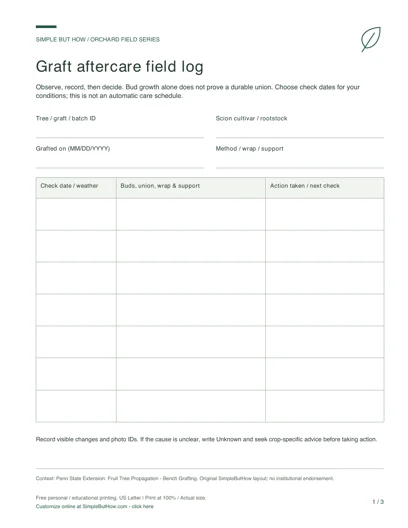
Keep the identity of a graft beside the observations that follow it. This aftercare template separates what you saw, what you did and when you chose to check again. Use one file for a graft or clearly identified batch, rather than relying on memory across similar-looking trees.
Click-to-edit template · 3 layouts · No sign-up · Private, local editing
READY TO PRINT · NO FORM TO FILL
Free Graft Aftercare Log PDF
Download this original three-page set now, or use the editor below to make a personalized sheet.
- Dated field log
- Detailed observation cards
- Season-end graft review
This download: 8.5 × 11 inches · Low-ink design · 0.75-inch left binding margin. Print at 100% / Actual size. Blank print-and-write pages, not fillable PDF forms. Choose an interactive PDF or A4 edition below. Free personal and educational use; no email or account required.
More PDF formats: fillable & A4
Download first, open in a PDF reader, type into the fields and save a copy. Check the saved file before printing. Sketch areas stay blank for drawing; costs do not calculate automatically.
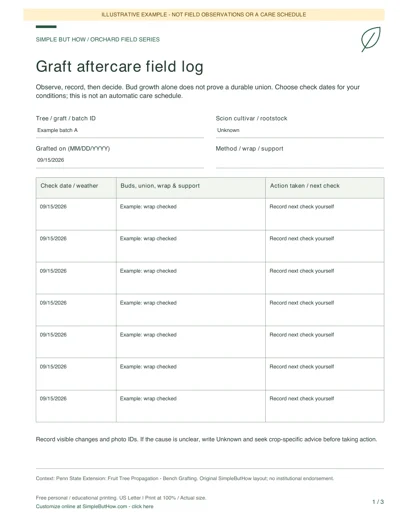
See how a completed sheet can look: clearly marked examples, not actual field records.
Build your own orchard field sheets
Choose a worksheet, enter your details and preview the result. Each tool has its own downloads; you do not have to print the whole page.
Private by design: no account or email gate. Device-draft saving is optional and off by default in the template editor. Download a JSON data file before leaving, and load it here later to continue. Saved files contain your entries: keep them private.
Blank PDF (3 pages, US Letter) · Filled sheets: HTML download or Print / Save PDF · Spreadsheet data: CSV · Editable backup: JSON
1Graft aftercare log generator
Keep dated observations, actions and your chosen next-check dates for one graft or batch. Add up to 30 entries.
New growth alone does not prove a durable union. This is a record of your observations, not a diagnosis or an automatic aftercare schedule.
HTML opens offline in a browser; print it or save it as PDF. CSV is a spreadsheet export, not the editable backup. Load the JSON file above to edit later. Print opens your browser dialog; it does not automatically download a PDF.
Enable JavaScript to generate a filled preview, or use the blank PDF pack.
How to use this template
- Name the tree or batch, scion/rootstock pairing, grafting date and technique. These details link the log to the physical label.
- Add a dated record for each inspection. Describe the buds, union, wrapping and support in your own words. Duplicate a record only as a starting point and correct its date and observations.
- Record your action and your own next-check date. Print the log for field use or export CSV to organize records; keep JSON to continue editing here.
A useful record, not invented evidence
A useful entry says which tree was checked, the actual date and a specific observation. “Bud movement observed; support still secure” is more informative than marking a graft successful. The example dates are illustrative, not a recommended inspection interval.
Questions about this generator
Does the log tell me when to remove grafting tape?
No. Material, growth and conditions differ. Follow crop- and material-specific guidance, inspect for constriction, and record your decision rather than relying on an automatic date.
Does new growth prove the graft worked?
New growth alone does not establish a durable union. The template records observations; it does not diagnose compatibility, healing or long-term performance.
How many inspections can I keep?
Each project supports up to 30 entries. Save a new dated JSON file or start a second log when you need more records.
Keep your editable copy
Save project (JSON) retains your fields and design choices. Optional device drafts are off by default: if enabled, valid edits are saved only in this browser, with explicit Restore and Delete controls. There is no server-side account or cross-device sync. Browser data can be cleared, so keep a downloaded JSON backup and avoid device drafts on shared computers. Leave warnings depend on browser support and are not a backup.
An HTML or PDF download is a presentation copy. When you load a file, it is read in your browser, not uploaded. Layouts adjust to your content. Long entries may use more than one printed page; check the browser print preview and choose the matching A4 or Letter paper size. Template changes preserve your entries.
Explore all six field-template generators